Now available for beta testers זמין עכשיו בגרסת בטא לבדיקה

AI-powered editing
for Torah texts
הגהה חכמה
לטקסטים תורניים

Professional proofreading, source verification, and intelligent search — seamlessly integrated into Microsoft Word. הגהה מקצועית, אימות מראי מקומות וחיפוש מקורות חכם — הכל משולב בטבעיות ב-Microsoft Word.

Download for Windowsהורדה ל-Windows See featuresתכונות
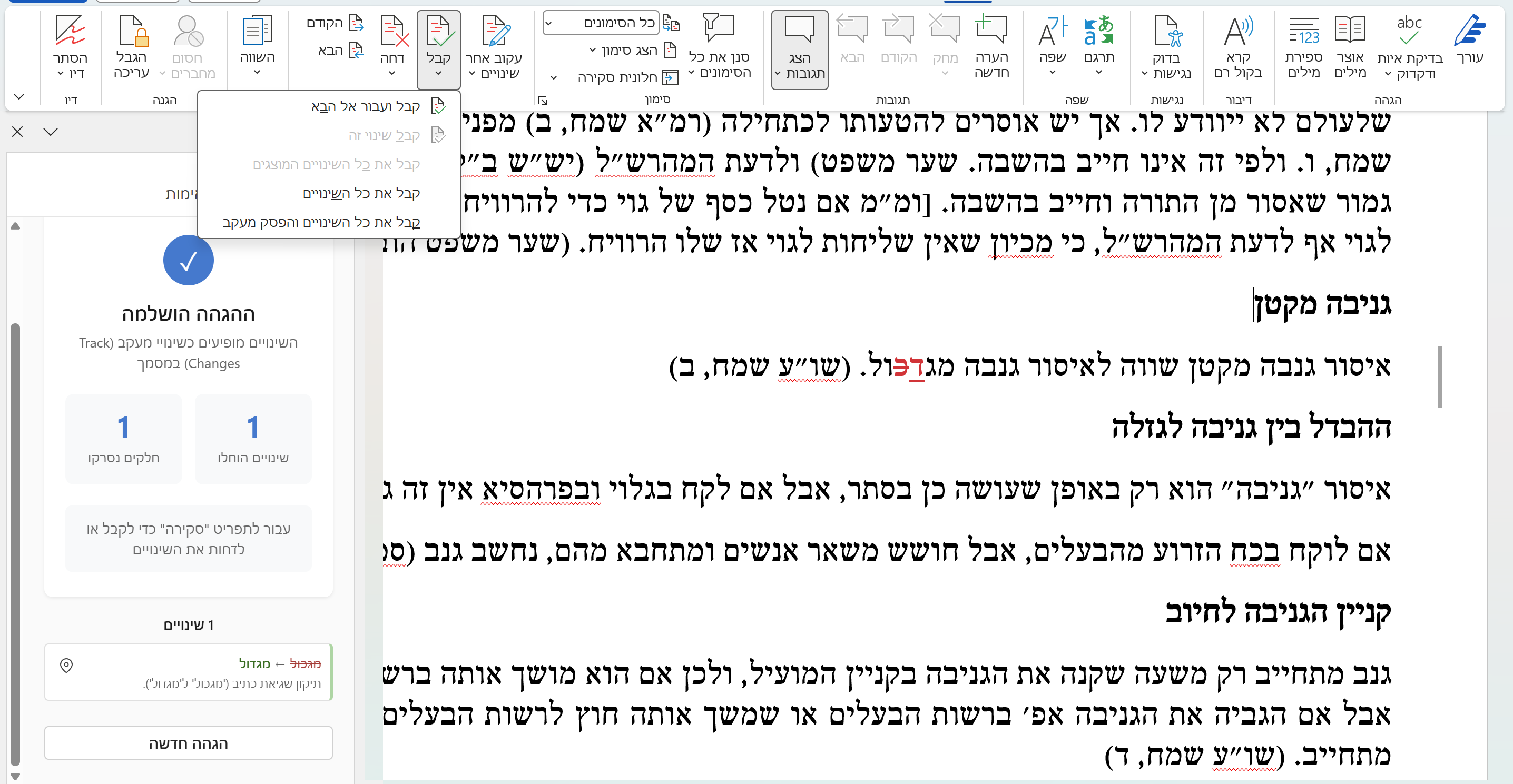
Mugah proofreading in action inside Microsoft Word
AI Proofreadingהגהה חכמה

Intelligent editing that understands Torah texts הגהה מתקדמת שמבינה טקסטים תורניים

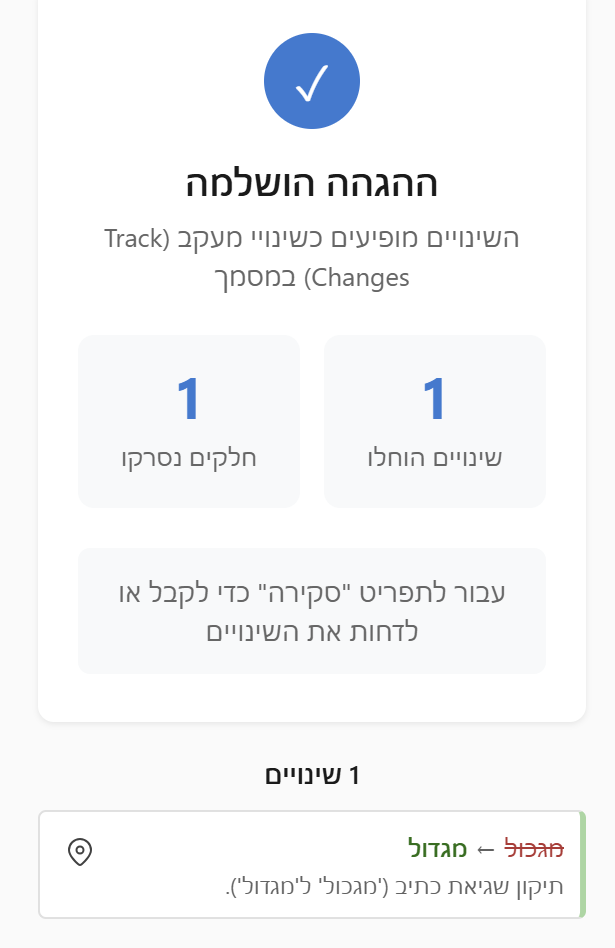
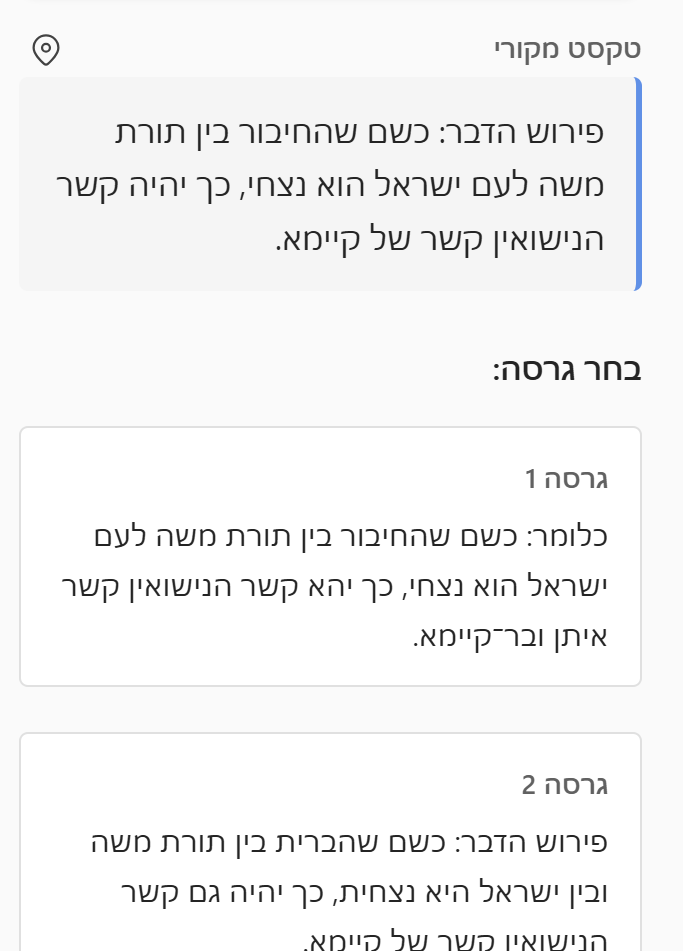
Analyze paragraphs, footnotes, and endnotes with AI that's tuned for Hebrew Torah scholarship. Every suggestion appears as a Word track change — accept or reject with full control. ניתוח פסקאות, הערות שוליים והערות סיום באמצעות מנוע חכם המותאם לעולם הכתיבה התורנית. כל הצעת תיקון מופיעה כמעקב שינויים ב-Word — קבלו או דחו כל תיקון לפי שיקול דעתכם.

  • Customizable editing rules per sectionכללי הגהה גמישים הניתנים להגדרה והתאמה אישית
  • Preserves formatting and document structureשמירה על עיצוב ומבנה המסמך
  • Handles complex Hebrew typographyתמיכה בטיפוגרפיה עברית מורכבת
Proofreading interface with track changes
Source Verificationאימות מראי מקומות

Validate every citation automatically אימות אוטומטי של כל מראה מקום

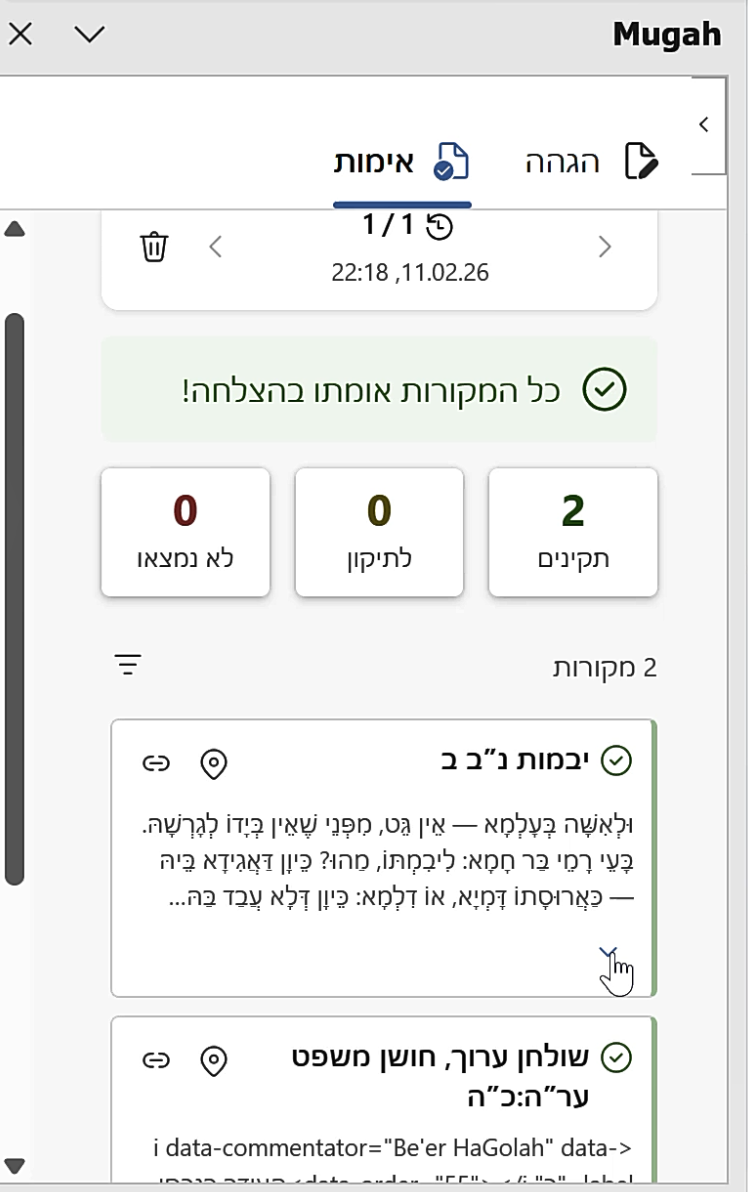
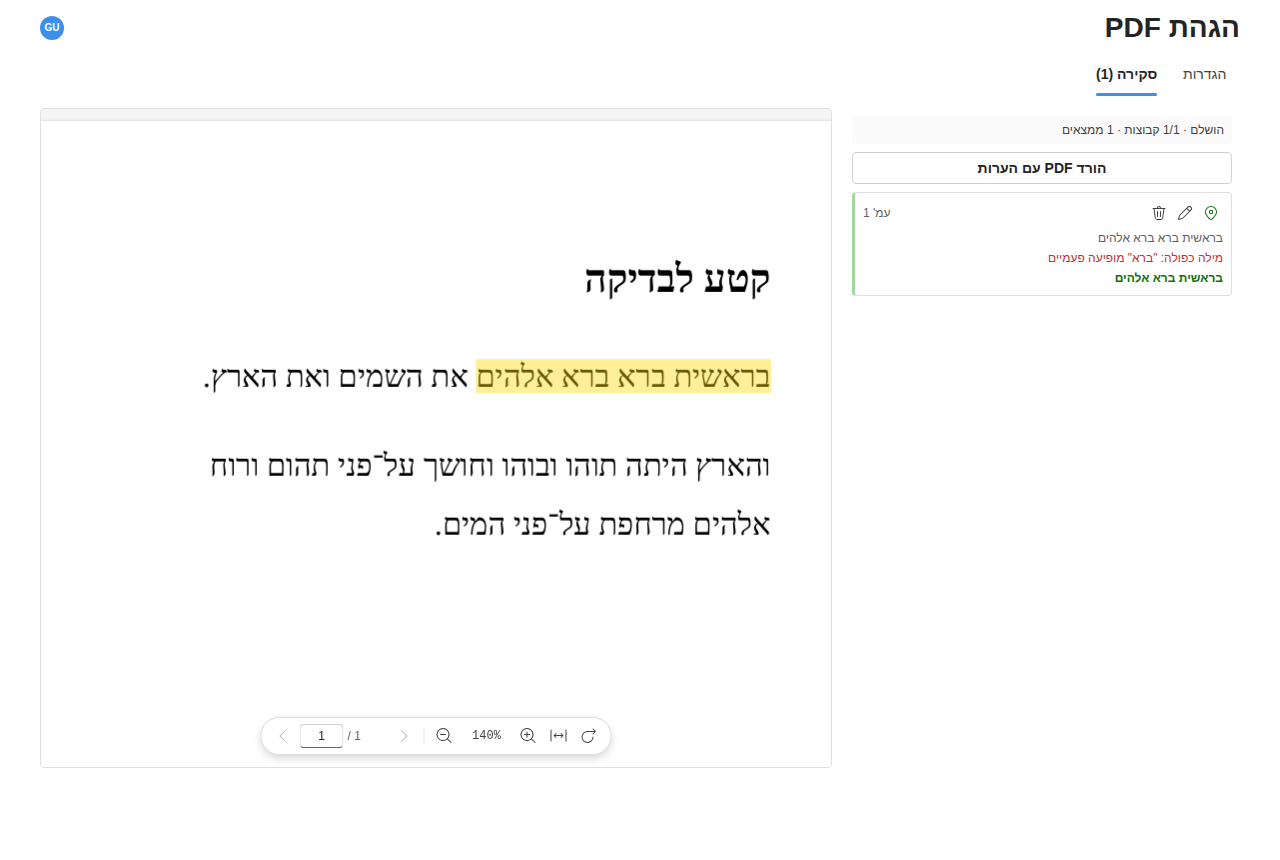
Cross-references your footnotes and endnotes against the Sefaria database. Instantly see which sources check out and which need attention. הצלבת ציוני מראי מקומות מול מאגר תורני. גלו מיד אילו מקורות מדויקים ואילו טעונים בדיקה נוספת.

  • Validates Torah references against Sefariaאימות מראי מקומות מול מאגר ספריא
  • Adds review comments for issuesהוספת הערות ביקורת במקומות שדורשים תשומת לב
  • Link to the original textקישור פעיל לטקסט המקור
Source verification panel showing validated citations
Torah Searchחיפוש מקורות

Find the right source in seconds מציאת מקורות נוספים — תוך שניות

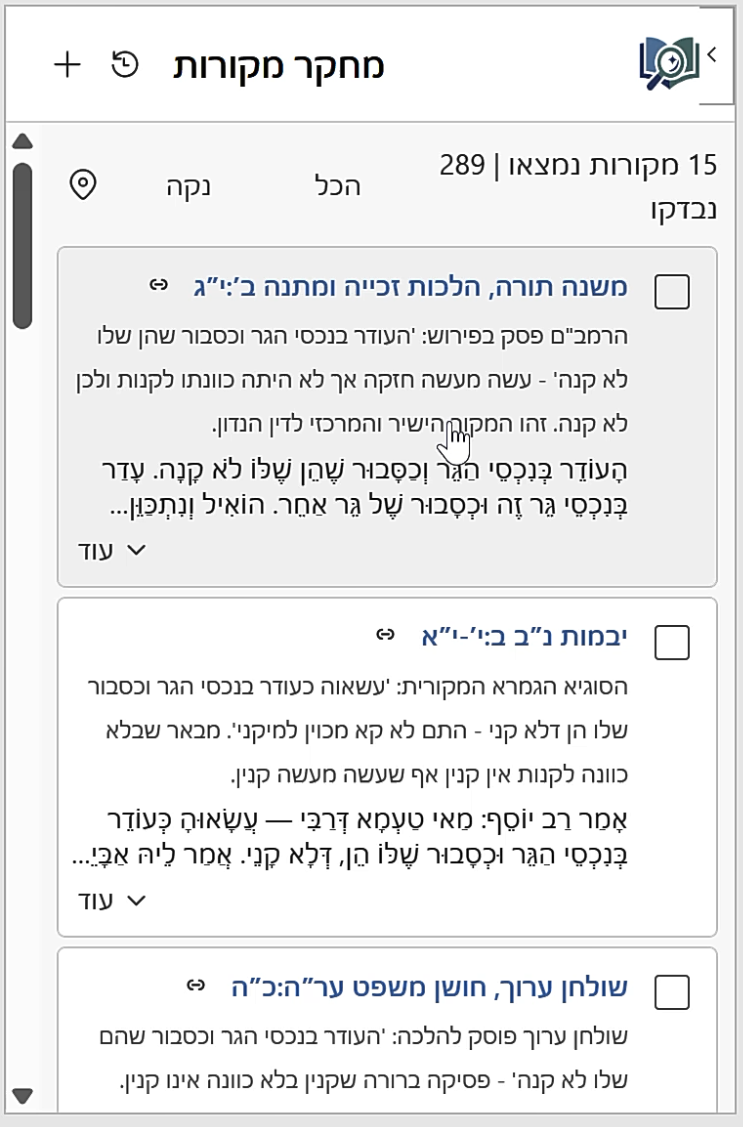
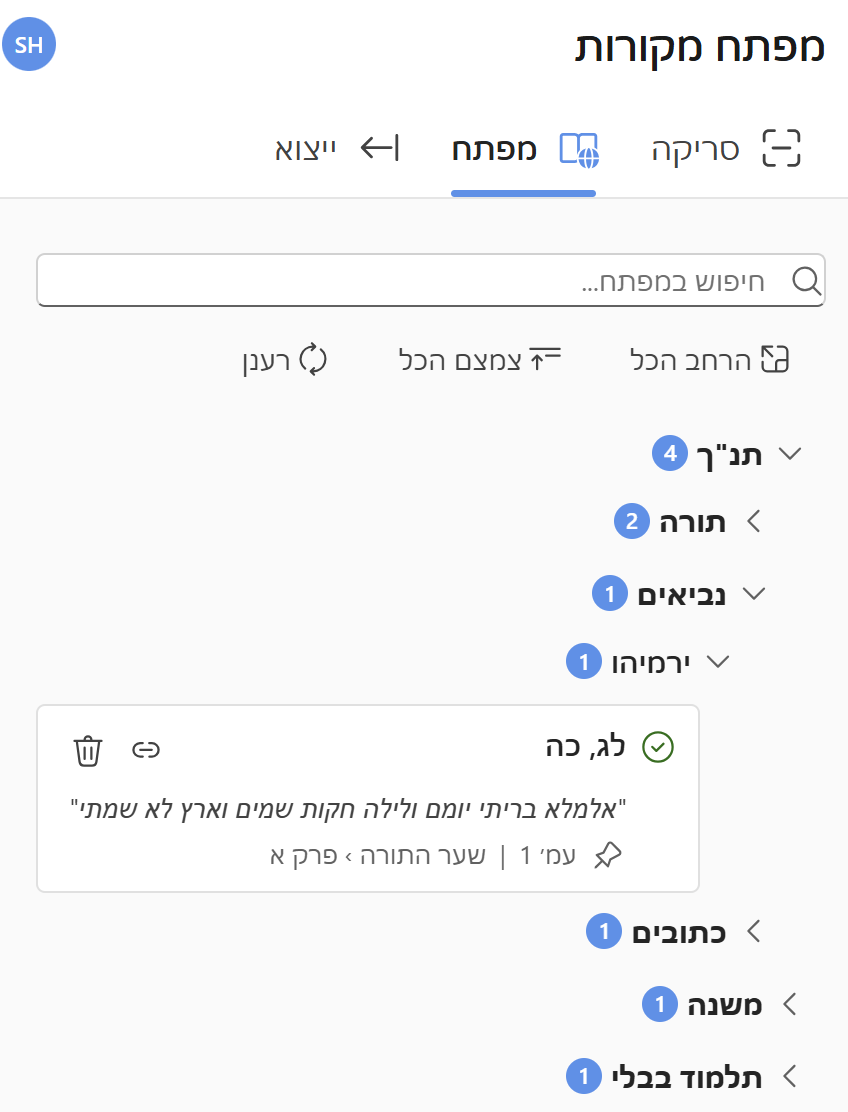
Describe what you're looking for in natural language and let AI search across Torah, Talmud, Midrash, and more. Then use Smart Addition to weave sources into your document intelligently. תארו בשפה חופשית את מה שאתם מחפשים, והמערכת תסרוק עבורכם את התנ"ך, ש"ס ומפרשיו, ספרות הלכה ושו"ת, מדרשים, חסידות, מוסר ועוד. השתמשו בהוספה החכמה כדי לשלב מקורות במסמך בדיוק במקום הנכון ובנוסח המתאים.

  • Natural language search powered by AIחיפוש חכם בשפה טבעית
  • Full text from the Sefaria libraryטקסט מלא מתוך מאגר ספריא
  • Insert as footnotes, endnotes, or inlineהוספה כהערת שוליים, הערת סיום, או בגוף הטקסט
  • Smart Addition — AI places citations at the right spot in your text, preserving existing notesהוספה חכמה — המערכת משלבת את המקורות החדשים בדיוק במקום הנכון, תוך שמירה על תחביר וסגנון מתאימים
Torah search results with source text

Built for serious Torah scholarship נבנה עבור עולם העריכה התורני

Every detail is designed for the unique demands of Hebrew Torah document editing. כל פרט עוצב בקפידה עבור הצרכים הייחודיים של הגהת כתבי קודש בעברית.

Format Preservationשמירת עיצוב

Maintains your document formatting while applying corrections. Works with complex Hebrew typography and layouts. שמירה על עיצוב המסמך תוך ביצוע תיקונים. תמיכה מלאה בטיפוגרפיה ופריסות עבריות מורכבות.

Track Changesמעקב שינויים

Every edit appears as a Word track change, giving you full control to accept or reject individual suggestions. כל תיקון מופיע כמעקב שינויים ב-Word, ומעניק לכם שליטה מלאה לקבל או לדחות כל הצעה בנפרד.

Custom Rulesכללים מותאמים אישית

Configure general and section-specific editing rules. Adapt the AI to your style guide and preferences. הגדירו כללי הגהה משלכם. שימרו מספר סטים של הנחיות לשימושים שונים. התאימו את המערכת לסגנון ולהעדפות שלכם ולטקסט עליו אתם עובדים.

Get started in minutes מתחילים תוך דקות

E . התקנה פשוטה וקלה ללא סיבוכים

01

Install the add-inהתקינו את התוסף

Download the installer and run it, then enable the addin in MS-Word.הריצו את תוכנית ההתקנה ולאחר מכןהפעילו את התוסף מתוך Word.

02

Open your documentפתחו את המסמך

Works with any Word document containing Hebrew Torah text.עובד עם כל מסמך Word שמכיל טקסט תורני.

03

Run analysisהריצו ניתוח

Select text or analyze the entire document with one click.סמנו טקסט או נתחו את המסמך כולו בלחיצה אחת.

04

Review & acceptבדקו ואשרו

Review suggestions as track changes and accept what works.עברו על ההצעות כמעקב שינויים וקבלו את מה שמתאים.

Start editing smarter התחילו להגיה בצורה חכמה

Join scholars and editors who use Mugah to improve their Torah documents. Download the installer and get started in minutes. הצטרפו לעורכים ולמגיהים שכבר משתמשים במוגה לשיפור כתבי הקודש שלהם. הורידו את תוכנית ההתקנה והתחילו תוך דקות.

Requires Windows 10+ and Microsoft Word 2019 or later דורש Windows 10 ומעלה ו-Microsoft Word 2019 ואילך